
How to check for new email in Mozilla Thunderbird?
Thunderbird is an Email Client Software, and you can work with it in the following way.
1. Open Mozilla Thunderbird.
2. In the left panel, you can see a list of your email accounts. Double Click on Inbox or if it is hidden, click on your email, and it will expand and show the inbox, the trash list. Etc. 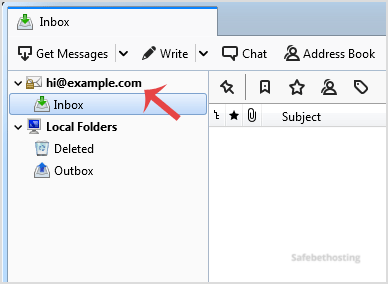
Another option is to right-click on the email and click on "Get Messages".
Thunderbird also automatically checks email every 5 to 10 minutes. It also automatically checks mail when you open the program.
Call now to get more detailed information about our products and services.
(214)-779-5144
 Copyright © 2025 All Rights Reserved
admin@safebethosting.com
Waxahachie, Texas 75165, USA
