
How to check if your domain is using Cloudflare in cPanel?
You can check the status of your Cloudflare from your cPanel.
1. Log into your cPanel account.
2. In the Software section, click the Cloudflare.

3. Click on Sign in Here to access your Cloudflare account.

4. Click on the Domains menu.

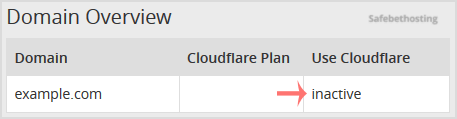
5. Below the Use Cloudflare text, if your domain uses Cloudflare, the status should be Active. However, if it is inactive, it means your domain is not using Cloudflare.
Call now to get more detailed information about our products and services.
(214)-779-5144
 Copyright © 2025 All Rights Reserved
admin@safebethosting.com
Waxahachie, Texas 75165, USA
