
How to create an FTP Account in cPanel?
You can use your cPanel username and password to access all folders and files via FTP. However, if you want to create an FTP user account for a specific folder or you don't want to allow access to your root files then you can create a separate FTP Account.
1. Log into your cPanel account.
2. In the Files section, click on FTP Accounts Icon.

3. Under Add FTP Account text, fill in the following details:
- Log in: FTP Username like new-user (without space)
- Password: (Enter new FTP Password or generate a new password by clicking on the Password Generator button)
- Directory: If you want to give access to the entire /public_html folder, enter public_html or change folder path to a different path like public_html/new-user, and your FTP user will be granted access to only the new-user folder. Your FTP user will also be unable to access folders outside of the public_html/new-user folder.
- Quota: Specify the quota in numerical words or select unlimited.
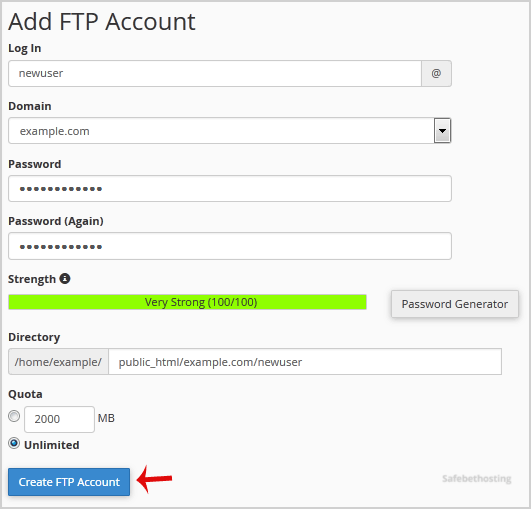
4. Click on the Create FTP Account button.
Now you can access your FTP Account by using your newly-created FTP account like:
- Host: Your Website IP or enter your website name like ftp.example.com (replace example.com with your website address).
- Username: NewFTPUser@example.com
- FTP Port: 21 (Default port is 21)
- FTP Password: Your FTP Password
Call now to get more detailed information about our products and services.
(214)-779-5144
 Copyright © 2025 All Rights Reserved
admin@safebethosting.com
Waxahachie, Texas 75165, USA
