
How to force cPanel users to change their passwords using WHM?
Do you want to force your cPanel users to change their passwords after login? If so, follow this tutorial.
1. Login to your WHM Account.
2. Go to Account Functions >> Force Password Change or type Force Password in the search box, and the option will appear.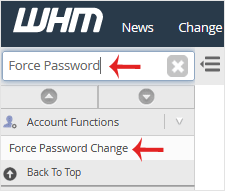
3. Under Force Password Change, you can click on Select All or choose the selected user. Then, click the Submit button.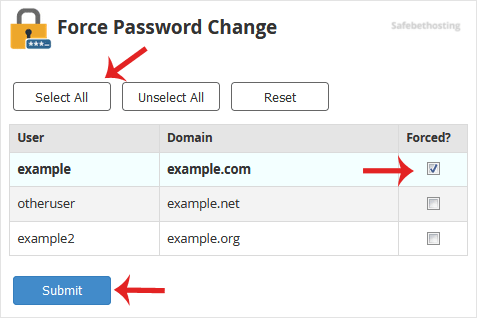
Now, it will force your users to change their passwords after login.
Call now to get more detailed information about our products and services.
(214)-779-5144
 Copyright © 2025 All Rights Reserved
admin@safebethosting.com
Waxahachie, Texas 75165, USA
