
How to Redirect subdomain to an external URL?
1. Log into your cPanel account.
2. In the Domains section, click on Subdomains Icon.

3. Under the Modify a Subdomain list you can see a list of subdomains.
4. Click the Manage Redirection link that corresponds to the subdomain that you wish to manage.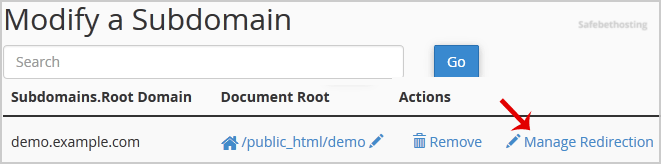
5. Under the Subdomain Redirection option, you should enter the link to which you want to redirect the subdomain in the available text box.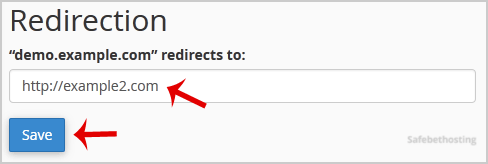
Call now to get more detailed information about our products and services.
(214)-779-5144
 Copyright © 2025 All Rights Reserved
admin@safebethosting.com
Waxahachie, Texas 75165, USA
