
How to set a preferred payment method in PayPal?
With multiple Debit or Credit cards, you can set your proffered payment method in PayPal.
1. Log-in to your PayPal account.
2. On top of the menu, click on Wallet.

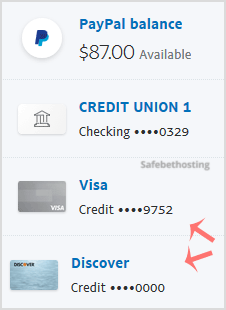
3. On the left side, click on the card you wish to set up as the preferred payment method.
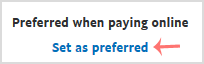
4. Find Set as preferred and click on it.
Call now to get more detailed information about our products and services.
(214)-779-5144
 Copyright © 2025 All Rights Reserved
admin@safebethosting.com
Waxahachie, Texas 75165, USA
